Building Cobalt: from a blank template to a real Feeef storefront
My working notes on designing, debugging, testing, and publishing a Feeef template—with a real demo store, screenshots, and a live playground.

I wanted to put the template system through the same work I ask other developers to do: start with a blank package, make actual design decisions, connect a real catalog, discover what breaks, and publish something someone else can install.
This is that build. The template is Cobalt, and its demonstration store is Cobalt Objects. It sells a fictional collection of desk objects: a blue lamp, an aluminum catchall, and a ceramic pencil cup. The store uses real Feeef product records. The objects, prices, and photographs are demonstration content; no orders are fulfilled.
The distinction matters. A beautiful screenshot can conceal a lot. A working storefront has to survive navigation, an empty catalog, missing translations, a page reload, and an order form that refuses incomplete information. I wanted to show those parts too.
I started with a shop, not a component list
Before choosing a grid or writing a hero, I chose the kind of merchant this template should serve. Cobalt is for a small, focused collection of useful design objects. Three clear products are enough to expose the shopping journey without hiding the design behind a hundred photographs.
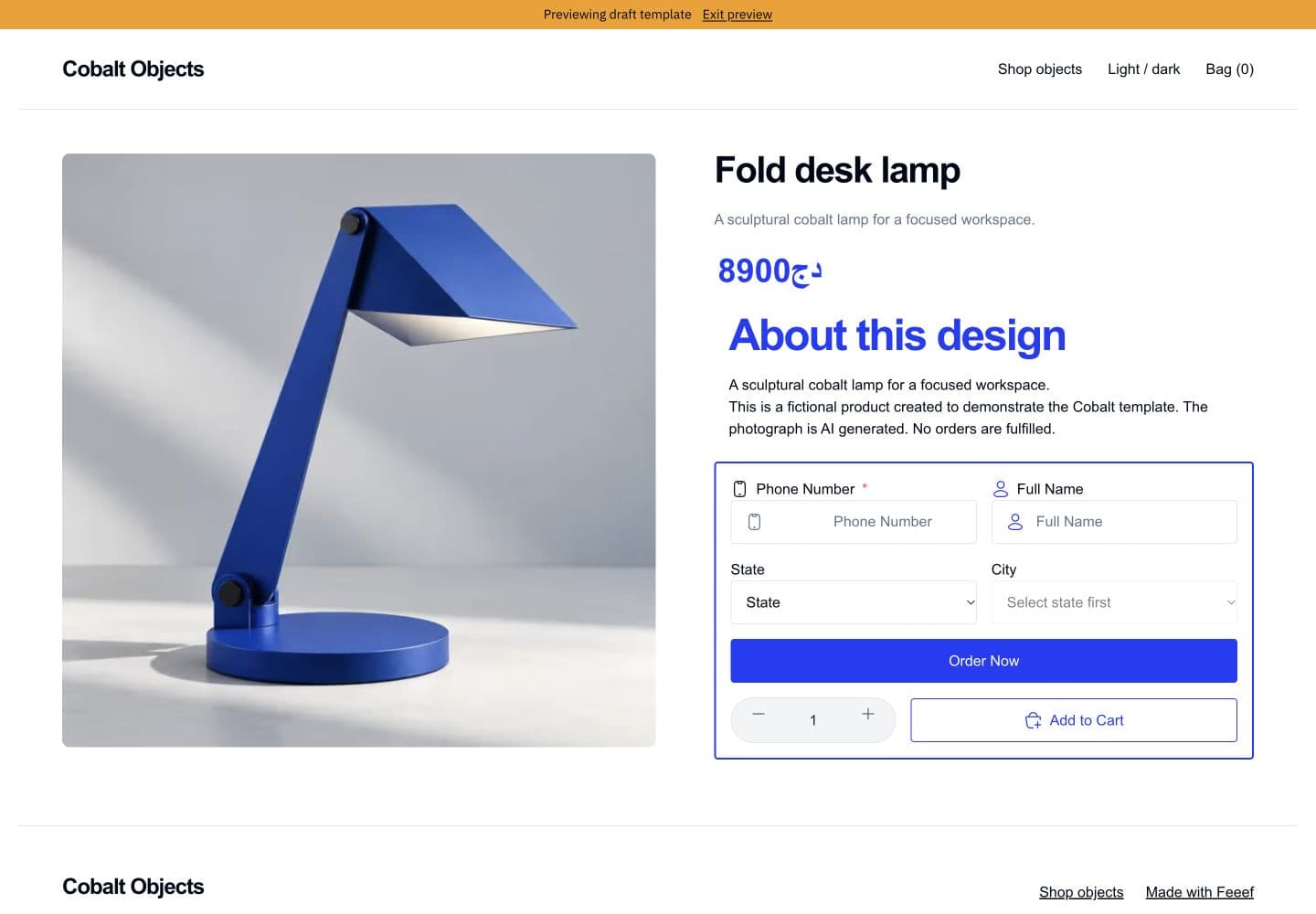
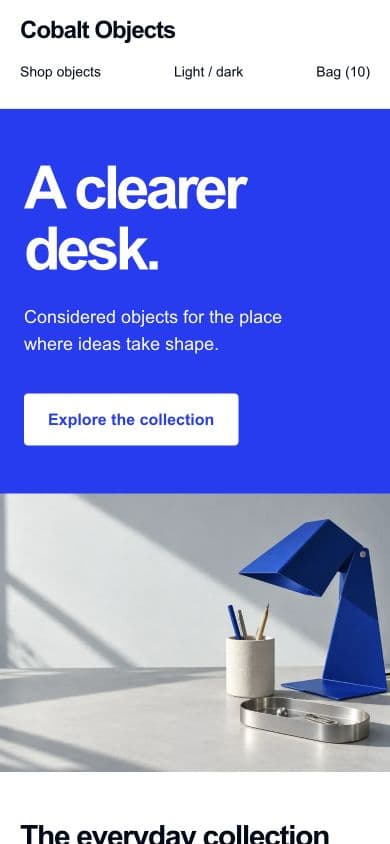
The visual language follows that choice: saturated cobalt, cool studio photography, generous space, and direct typography. The hero is a solid color panel beside a photograph. The catalog is quieter. Product pages give the object a large image and place the buying interface next to it. Checkout gives the customer fewer distractions.
I used system sans typography rather than adding a runtime font request. The design can carry its identity through proportion, spacing, color, and imagery. That is also a portability decision: a template should remain convincing when another store installs it with different content and its own primary color.
I wrote these rules down in design-system.md before polishing the interface. The document covers foundations, layout, focus states, motion, language direction, currency, forms, and the QA cases I wanted to check. Its purpose is practical: the next component should not introduce a different set of corners, shadows, or field styles because it happened to be written later.
The motion budget is deliberately small. Buttons have brief feedback. Above-the-fold content is visible immediately. There is no entrance sequence that makes a product wait for an animation before it can be seen.
The blank kit was smaller than I expected
The first command was ordinary:
feeef template init cobalt --blankIn this workspace, the CLI resolved the official blank kit from the local theme-kits/blank repository. It cloned successfully. The result contained a homepage, schema, props, and starter components—but it did not contain a complete shop.
That is an important detail to record because the available bundled scaffold was newer and had a fuller form composition. The kit selected by initialization and the bundled scaffold were not identical. I did not quietly assume that a successful initialization meant all the pages and current form pieces were present.
I added the missing routes with the CLI:
feeef template add page products
feeef template add page product
feeef template add page checkout
feeef template add page thank_you

feeef template add component products catalog
feeef template add component product product-layout
feeef template add component checkout checkout-layout
Adding a page creates its directory and updates the package manifest. I also updated schema.ts to declare the corresponding page and layout. Files on disk and the editor's page catalog are related, but they are not the same thing.
The final route map is intentionally conventional:
| Template page | Storefront route | Responsibility |
|---|---|---|
home | / | Introduction and a featured collection |
products | /products | Searchable, sortable product list |
product | /p/:slug | Gallery, details, price, and product purchase form |
checkout | /checkout | Current-store cart and delivery information |
thank_you | /thanks | The platform's order confirmation component |
There was even a small command-line mistake before this: I invoked the CLI using a path relative to the repository root while already working inside templates/. Node could not find it. Correcting the working-directory-relative path fixed it. It is not an architectural failure, but it belongs in an honest account of how the build started.
The design becomes a document
Cobalt's source package has a few distinct responsibilities:
schema.ts                         editor pages and root controls
props.json                        root defaults
pages/home/components/hero.tsx    hero implementation and editable fields
shared/components/header.tsx     reusable navigation and theme chrome
shared/components/catalog.tsx    shared product-list implementation
pages/product/components/        product layout and named slots
pages/checkout/components/       checkout layout and slotted form flow
locales/{en,ar,fr}.json           theme-authored language messages
assets/                          generated photographs and public demo records
The build turns this into dist/data.json and dist/schema.json. I edit source files and rebuild; I do not treat a large generated JSON document as the authoring interface.
A page placement of the shared header is a small declaration:
{
  "$ref": "shared.header",
  "instanceId": "cobalt_home_header",
  "order": 0,
  "props": {}
}
This is compile-time reuse inside the package. It keeps the source in one place. Publishing can additionally create backend component-library references, which are a separate mechanism with separate resolution and access concerns.
The hero is a flat TSX component. Its meta defines the editable heading, summary, image, and image description. function App() reads the injected props and produces the interface. The merchant owns content; the component owns how that content is presented.
const propsSchema = {
  heading: { type: 'string', name: 'Heading' },
  summary: { type: 'text', name: 'Summary' },
  image: { type: 'image', name: 'Hero photograph' },
  imageAlt: { type: 'string', name: 'Image description' },
} as const;
A heading is a reasonable merchant control. Every CSS declaration is not. I kept the schema focused on meaningful content decisions and used responsive CSS for layout. Store decoration supplies brand color through the platform's semantic tokens.
Make Cobalt your own
A local model of the hero’s props and responsive layout. Changes stay in this playground.
Inspect the updated JSON node
{
  "type": "custom",
  "instanceId": "cobalt_home_hero",
  "props": {
    "heading": "A clearer desk.",
    "summary": "Considered objects for the place where ideas take shape.",
    "image": "/blog/building-cobalt/hero.webp",
    "imageAlt": "Cobalt desk objects"
  }
}
Heading, summary and image are instance props. Color comes from store decoration; stacked mode demonstrates a CSS breakpoint. This preview does not execute published component code.
The playground above demonstrates those boundaries. Editing the heading changes a prop. Changing the primary color models a store setting. Stacking the preview models a breakpoint. The playground is a local React model; it does not evaluate arbitrary published code or modify the demonstration store.
Making the imagery, and keeping its limits visible
I generated four images: a landscape still life for the hero and one product image for each object. The prompts shared a visual vocabulary: cool grey backdrops, architectural sunlight, powder-coated cobalt, brushed aluminum, and chalk-white ceramic.
I inspected the images before using them. They work as a coherent design study, but the lamp in the hero is not an exact manufacturing match for the lamp in its individual product photograph. Generative imagery can preserve atmosphere while changing geometry. For a real merchant, that mismatch would require correction using accurate product photography or a stricter image-editing workflow.
Here, the objects are fictional and the store explicitly says so. I did not invent material certifications, reviews, delivery promises, or measured specifications to make the catalog feel real.

I encoded the selected images as WebP before uploading them. The local hero is roughly 44 KB; the individual product assets are roughly 18–24 KB. Those are file sizes for these assets, not a promise about total page weight or a Lighthouse score.
The hero has explicit dimensions and high fetch priority. Product cards have dimensions, lazy loading, responsive image candidates, and a thumbnail helper for recognized image hosts. The homepage also respects the product rows seeded by the server rather than immediately replacing them with another fetch.
The store API made one missing assumption obvious
I created a dedicated store for this template rather than editing an existing customer store. Its description identifies it as a demonstration, its active language is English, and its country and currency are configured for Algeria.
The first create request failed with a 422: I supplied the primary brand color but omitted decoration.onPrimary. The API requires both. It is easy to think of a color as one setting; a usable surface also needs a foreground color.
Adding a contrasting foreground fixed the request. I then created the three published product records with their names, demo prices, image URLs, media arrays, descriptions, and markdown bodies.
Another route assumption failed during asset upload. The image endpoint is:
POST /v1/services/storage/uploadMy first request used /v1/storage/upload and received a 404. Reading the SDK's storage service revealed the correct nested route. The lesson is very ordinary: inspect the route group or SDK method instead of guessing from the leaf route name.
The API token was used for authentication, outside the template source and the article. It is not a storefront dependency. Installing Cobalt should never require the author's credential.
The first hosted preview
A template build passing is not enough to establish that the shop works. I pushed the built document and schema to the dedicated store's draft preview endpoint, then opened the hosted preview.
PUT /stores/:id/template-preview
             ↓
metadata.templatePreview
             ↓
hosted storefront with preview cookie
This changes the draft document, not the live storefront document. The preview uses the actual product catalog. The orange banner in the screenshots is the platform's draft-preview indicator, not part of Cobalt's design.

Seeing the page in the browser answered questions that JSON could not: whether the hero had a useful proportion, whether the image crop worked, whether the navigation stayed legible, and whether a product link actually loaded the product route.
I also checked the responsive layout instead of describing it as responsive just because it contained a media query. The split hero becomes a vertical stack. The catalog steps down from three columns to two and then one. The product gallery and purchase panel stack below the desktop breakpoint.
The catalog has to behave like a catalog
The homepage and products page share a catalog implementation, with a featured prop selecting the homepage behavior.
On home, the component reads useSlotContext('homeProducts'). If it receives server-seeded rows, it keeps them. Fetching the same products again on mount can replace images or reorder cards just as the page finishes loading. Avoiding that unnecessary replacement helps the initial paint remain stable.
On /products, search, ordering, and paging are request parameters. The URL retains the state:
/products?q=tray&sort=created_at%3Adesc&page=1The request includes the store id. Search uses the SDK's search parameter. Sort is sent to the server. The component does not fetch an entire catalog and pretend that filtering twelve local items is a complete search result.
I tested a search for tray, and the hosted catalog returned the aluminum catchall. Loading, failure with retry, and empty results have explicit UI. Pagination uses returned metadata when available and a conservative page-size fallback when it is not. That fallback can offer a next page that turns out empty; it is a compatibility tradeoff, not an exact total-count guarantee.
Internal links use the platform's injected Link and router. They retain the normal storefront navigation behavior instead of asking a slot-context navigation stub to behave like a full router.
Product pages reuse the platform where it helps
The product page has a custom layout with two named slots: gallery and details. The actual gallery, name, description, price, markdown body, and product order form are native registry components.
That is a deliberate division of labor. A product page needs to understand media, current-product context, offers, variants, cart behavior, and shipping. Reimplementing all of those merely to put a gallery beside a form would create more places for behavior to drift.
The first hosted product page exposed a language issue. The store was English, but the native form wrapper supplied some Arabic default placeholders. I replaced the wrapper's fields object with explicit field visibility, required settings, and visible labels, allowing the native localized text fallback to run.
That fixed the visible field labels and placeholders. Some native quantity-control accessibility labels still come from platform code and can remain Arabic. Cobalt cannot honestly claim that every string in the underlying platform has been localized by this package.
I also reduced the markdown heading scale and softened the form border. A marketing section heading and a product-body subheading have different jobs; letting one broad CSS rule style both made the product details unnecessarily loud.
The checkout decision changed after reading the source
My initial checkout used the native cart_order_form. That looked like a sensible way to keep platform behavior. Then I inspected its implementation.
The older cart form still called feeef.orders.send directly from the browser. That is not the documented proxy contract for custom storefront order submission. It also had older language defaults. I did not want to describe reuse as a guarantee without checking what was actually being reused.
I changed checkout to use the newer bundled slotted COD manager and adapted it for the cart. This added more theme-owned code, which is a real maintenance cost. It also gave me explicit control over the submission path and independently editable field blocks.
The structure is a short checkout layout, a form manager, and a content slot containing the cart summary, customer fields, geographic selectors, custom fields, shipping options, and buy control. A separate success slot remains available for the confirmation fallback.
The manager submits through:
POST /api/orders/createIt retains exact-length phone drafts, the draft id when upgrading to pending, a honeypot, a minimum dwell check, an in-flight lock, client validation, handling for answers that are not real orders, and the existing pixel integration calls. I did not place an order during browser verification or claim that a live transaction had been completed.
A shopper sees cart lines belonging to the current store. Each line links back to its product page so offers or variants can be corrected there. Removing a line calls the real cart service.
The payload includes every current-store line, quantity, variant path, offer code, and addons. Bundled variant paths are expanded into individual item entries. After a confirmed real success, only those store lines are removed. An answer that is not a real order does not trigger the order redirect.
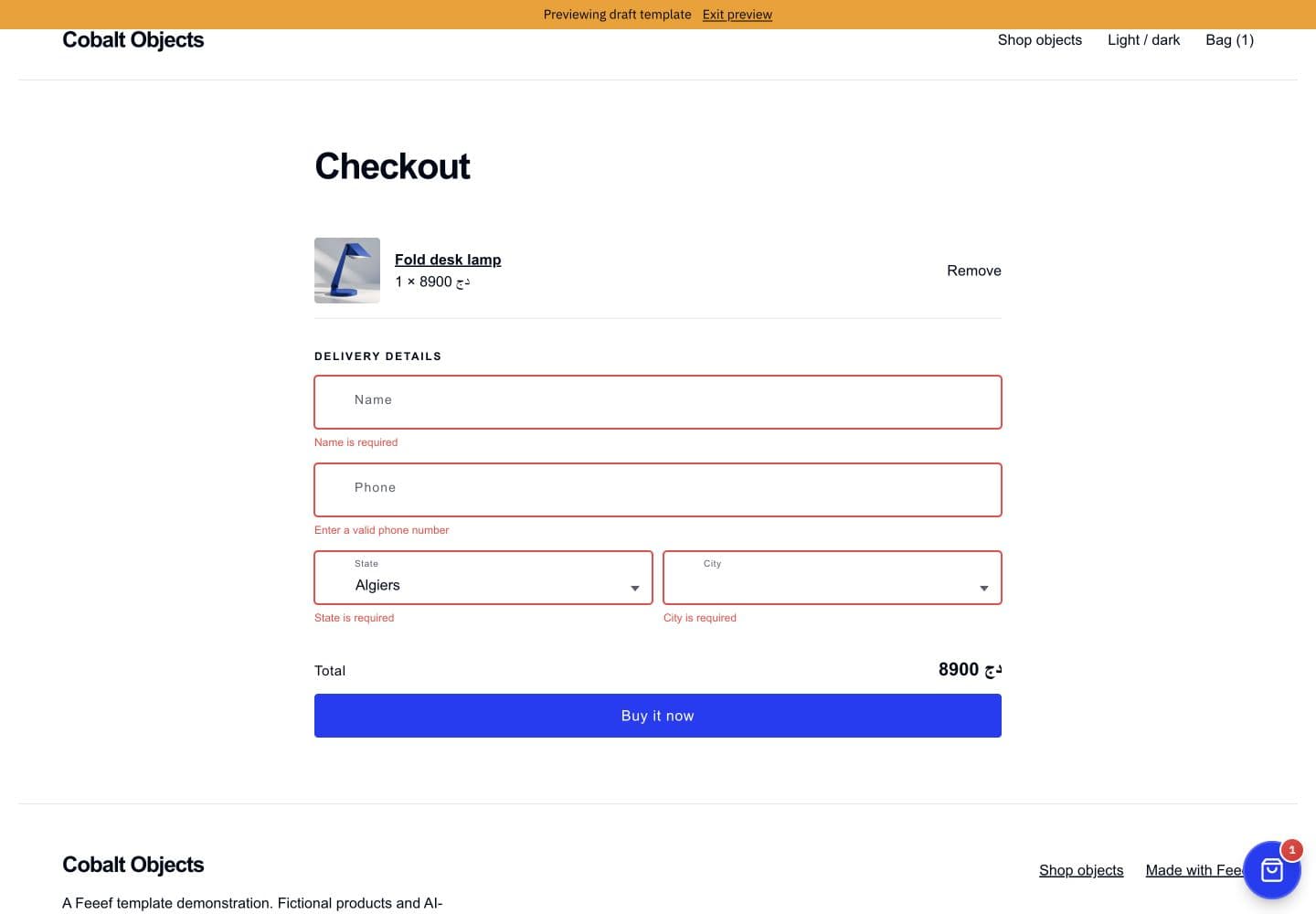
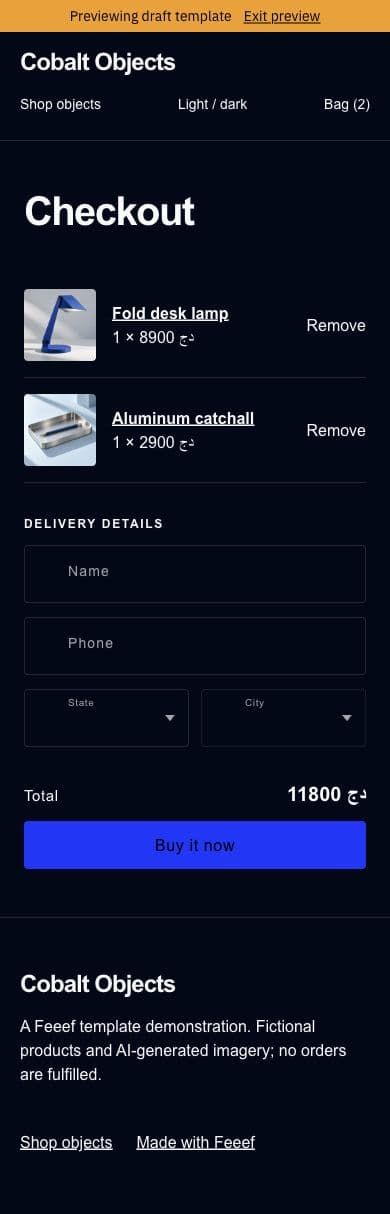
On mobile, the platform floating cart initially overlapped the buy area. Cobalt already exposes a bag link in its header, so I suppressed that wrapper with scoped CSS. That selector depends on platform markup and needs review if the wrapper classes change. It is a practical compatibility fix, not a new platform configuration API.
The borrowed manager's live inventory helper remains centered on the first cart product. Server-side multi-item pricing and availability validation are still essential. This release does not claim complete client inventory parity across every line or full parity with every platform security integration.
An editable field needs editable behavior
The form blocks already exposed hide and, for some fields, required. But an exposed control is only useful if validation respects it.
I connected the fields to a registration function provided by the form manager. Each field reports its visibility and required setting. The manager uses those settings when deciding which empty values block a pending order.
This avoids a particularly frustrating editor outcome: hiding an address field while the invisible address still prevents submission, or making a field optional while the manager continues treating it as required.
Name, phone, state, city, email, address, and note remain separate blocks. The merchant can change their order and settings. Custom-field definitions retain their own validation requirements.
Some checks are independent of field visibility. A nonempty phone still has to have a valid length. A product with a required variant still needs a selection. Hiding a visual selector should not create a bypass for a product policy.
The browser check confirmed that an empty checkout showed name, phone, state, and city errors. It stayed on checkout and did not create an order.
Geography is data encoding, not just a dropdown
Another source audit found that the starter geographic fields always preferred Arabic localized names, even in an English store. I changed that lookup to use the active locale.
I also added cancellation guards to the state and city requests. If a shopper changes state while a city request is still in flight, an old response should not overwrite the new state's city list.
There are two geographic modes to preserve:
| Store configuration | State value | City value |
|---|---|---|
Legacy Algeria without selectedCountry | Original 1-based state index | Original 1-based city index |
| New country configuration | State code | City name |
For the legacy branch, I reused the platform's exact lists and original indices. I did not invent an ordering from a new API response. Legacy shipping rates can hide unsupported states without renumbering the remaining ones.
The demo uses the new-country branch. Selecting Algiers enabled the city selector. Shipping remains connected to the cart service. No demo delivery promise or courier contract was invented to fill the screen.
The shipping reference lookup also needed care: the relevant field is shippingFeeId, and Cloud Parcel references such as ca_… or unassigned must not be sent to an old shipping-prices lookup.
The cart counter was not a count
This was one of the most useful discoveries in the build.
useFeeefCart() exposes a value called count, but the provider uses it as a mutation snapshot. It changes when shipping, a city, an offer, or another cart detail changes. It is not a reliable number of shopping-bag items.
The first header displayed that value. It could show a bag count even when there were no saved lines. I replaced it with the sum of quantities from cart.getAll(), filtered to the current store.
Then a reload exposed another assumption: the SDK cart in this implementation lives in memory. Adding a product worked across client navigation, but the selection disappeared after a hard reload.
Cobalt now keeps a store-scoped localStorage snapshot of public cart selections. The key includes the store id. Restoration is bounded, checks quantities and store ownership, and avoids re-adding existing lines. A cart listener saves changes, and the effect removes its listener when the header unmounts.
The theme does not persist the customer's phone, name, address, or email in that snapshot. It stores public product information and the selected quantity, variant, offer, and addons.
There is a tradeoff: a saved product snapshot can contain an old display price or stale stock information. The server remains authoritative when an order is created. A future refinement can refresh restored product records before displaying totals; the local snapshot must never become an authority for charging or inventory.
I verified this behavior in the hosted browser: add the lamp, reload the product page, and the bag still contains one item.
Language packs need a deep merge
The first slotted checkout rendered common.total and common.buyNow literally. That was not a mysterious translation-engine failure. I had merged the form pack and Cobalt's messages shallowly, replacing the entire common object.
Changing the merge to preserve nested keys fixed the missing messages. I also added the empty-cart message explicitly. The lesson is simple: a locale object is a tree, and merging it as if every top-level key were a scalar can discard working translations.
The package includes English, Arabic, and French theme messages. Direction and spacing follow the platform and logical CSS. Telephone digits remain left-to-right. Legacy Arabic place names come from the original geographic data; they are not a claim of translated catalog content.

The three demonstration products are English catalog records. Theme translations and catalog translations are separate responsibilities.
SSR helped, but it did not prove the shop
Cobalt follows the same rendering boundaries described in the introduction to the template design system.
The build produces component code. The storefront can precompile it and, on suitable hosts, run limited custom-component SSR in a worker. The server can seed homepage product rows through slot context. The browser later supplies the full interactive scope.
That does not mean a browser-only cart or form suddenly becomes a fully functional server component. Store, cart, and current-product hooks are limited in the worker scope. Named slots do not establish complete server/client parity merely because they are serialized in the document.
A theme still needs null guards and stable layout. It should reserve image space, keep initial product rows where possible, and avoid browser globals during render. Client-only state and effects remain client responsibilities.
The smoke test renders custom components with its test scope. It is useful for finding syntax and scope failures. It did not find the locale-merge problem, the misleading cart counter, or missing reload persistence. Those required a real browser and actual navigation.
Follow a storefront request
Explore the boundaries between the document, server, worker, and browser.
Select document
Load the store and select its live document, draft preview, or release preview. Materialize accessible component references before rendering.
TemplateData + resolved component bodiesWorker rendering is optional and uses a limited snapshot. Full SSR parity is not guaranteed.
This is why I resist treating “SSR” as a single yes/no badge. Compiling code, producing initial HTML, resolving runtime context, and making the shopping flow interactive are different pieces of work.
What I checked, and what I did not claim
The release checks include the template build, shape validation, TypeScript checking, custom-component smoke rendering, and the static performance scan. Browser checks cover the hosted home and product pages, catalog search, real add-to-cart behavior, reload restoration, checkout field validation, and the state/city cascade.
The performance scan initially warned that the product list lacked an obvious thumbnail-resize helper. I added the helper and responsive candidates. The final static scan reports no errors or warnings. That is not equivalent to a measured mobile Lighthouse score.
The visual checks include desktop and mobile layout, light and dark mode, and screenshots of the actual hosted store. I did not create a real customer order, charge a payment method, dispatch a parcel, or manufacture a successful transaction to make the article sound more complete.
The demo has no configured fulfillment operation. The template's native product form retains platform-owned behavior and some platform-owned limitations. Checkout's adapted manager needs further testing for unusual multi-item offer combinations, payment integrations, and stores with advanced security or inventory settings before claiming parity in those scenarios.
I want those limits to be visible alongside the finished design. A free public template can be useful without pretending that one demo catalog has exercised every possible merchant configuration.
Publishing should produce something another developer can use
Publishing has several responsibilities: upload component bodies, create the public listing, upload the locale bundle, create a versioned release, and install it on the demonstration store.
The command is explicit about visibility, price, and application:
feeef template publish \
  --public \
  --price 0 \
  --title "Cobalt — Desk Objects" \
  --changelog "First public Cobalt release" \
  --yes \
  --apply
--public makes the listing discoverable. A zero price makes this release free. --apply installs it on the bound demo store. Publishing a draft listing and actually applying it are distinct operations.
The template package contains the design and behavior. It does not import the demonstration catalog into another merchant's store. A new installation should use that merchant's products, language, currency, and decoration.
The hero photograph is an editable default asset. If a merchant sells different products, changing the hero image is part of configuring the theme, not a reason to fork the whole rendering system.
Publication completed on October 1, 2026. The public listing is jst5zghvriew, its first marketplace release is 0.0.1 (fcavjjhois3p), and its price is 0 DZD. I read the listing back without authentication and confirmed its public policy. The publisher installed that release on the demonstration store.
There was one more tooling problem: supplying --version 1.0.0 printed the CLI's own version and exited. The global and subcommand version flags collide in this CLI build. I removed the flag and accepted the automatic release version. The source package's version and the marketplace release version are separate values; I am recording the actual published version here.
The first normal storefront visit still showed the earlier default design because a cached store response survived publication. Opening the documented ?cache=0 path showed the installed template; a later visit to the clean public URL also showed Cobalt. Successful installation and fresh public rendering deserve separate checks.
Open the public demo or inspect the public template record. To download the free template into a new authoring project:
feeef template init my-cobalt --from jst5zghvriew
cd my-cobalt
feeef signin
feeef use
npm run build
npm run dev
I tested that download into a fresh directory: it unpacked five pages, fetched English, Arabic and French locales, and rebuilt successfully. This command creates an editable source project. Merchants can install the free listing through their store's Templates screen by finding Cobalt — Desk Objects. The demo store itself was installed through the publisher's --apply step.

What this build taught me about the system
The document model worked well for this kind of iteration. I could share a header, change a page layout, retain a native gallery, and adapt a form without creating an entirely separate storefront application.
The rough edges were also concrete. Initialization selected an older kit. Some defaults were language-specific. A native cart form did not match the newer submission guidance. The cart hook's count name hid its actual role. Persistence was absent. Locale merging could erase messages. These are useful findings because they point to improvements in tooling and contracts, rather than vague promises about developer experience.
For me, the template system is convincing when those findings can be handled without losing the separation between merchant content, component behavior, and platform services. Cobalt is a small example of that separation being exercised from the first command through a published storefront.
The screenshots and playground are here so you can inspect the result. The journal is here so you can inspect the decisions. And the public template is here so you can start from it, replace the catalog and imagery, and find the next thing we should make better.